

-
 Try out the new Jake: AI Coding Assistant for LabVIEW!
Get answers to questions about LabVIEW and discuss your code.
QuVI - Quantum Circuit by Murtaza Vefadar - Toolkit for LabVIEW Download
A toolkit to compose and simulate quantum circuits.
 Discussion

| Version | 2.0.0.4 |
| Released | Mar 22, 2026 |
| Publisher | Murtaza Vefadar |
| License | MIT |
| LabVIEW Version | LabVIEW>=20.0 |
| Operating System | Windows, Mac, and Linux |
| Project links | Homepage Repository Discussion |
Description
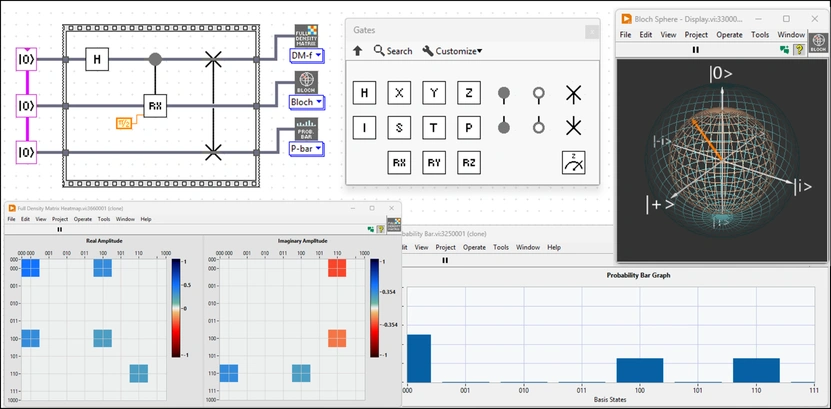
QuVI is an open-source quantum circuit simulation toolkit developed natively in LabVIEW. It provides a robust framework for designing, simulating, and visualizing quantum algorithms using LabVIEW's familiar dataflow paradigm.
Key Features:
- Intuitive Circuit Design: Build quantum circuits using standard LabVIEW wires and nodes.
- Hybrid Simulation: Seamlessly integrate classical control logic (loops, case structures) with quantum operations for dynamic algorithm execution.
- Parallel Execution Engine: Utilizes a custom, high-performance state-vector update engine that leverages CPU parallelism.
- Visualization Tools: Includes VIs for visualizing quantum states and probability distributions.
- Standard Algorithms: Comes with examples for Teleportation, Grover's Search, QFT, and Superdense Coding.
To build a quantum circuit in QuVI, follow this workflow:
1. Initialize Register: Stack "QuVI_Wire" subVIs vertically on the block diagram. The number of stacked VIs defines your qubit register size (e.g., stack 3 VIs for a 3-qubit system).
2. Define Circuit Canvas: Place a Flat Sequence Structure to the right of your initialization block. This structure acts as the timeline for your algorithm.
3. Establish Quantum Wires: Connect the reference output from each "QuVI_Wire" VI to the left border of the Flat Sequence Structure. These data pathways represent the physical qubits.
4. Apply Gates: Drag and drop gate VIs (e.g., H, X, CNOT) inside the sequence structure. Connect them left-to-right along the quantum wires to define the operation order.
5. Hybrid Control (Optional): Use standard LabVIEW structures (For Loops, Case Structures) inside or around the sequence to implement iterative algorithms (like Grover's search) or conditional logic.
Release Notes
Major Updates & New Features:
-Partial Trace & Advanced Analysis: Implemented the partial trace algorithm, unlocking powerful new subsystem analysis. This core addition enabled the new 3D Bloch sphere representation of qubit states, reduced density matrices, and Von Neumann Entropy calculations.
-Unified Polymorphic Analysis VI: Massively streamlined the user workflow by combining all major state inspection tools (probability, state vector, 3D Bloch sphere, density matrix, entanglement table,... ) into a single Polymorphic VI.
-Quantum Key Distribution (QKD) Examples: Added examples for the BB84 and BBM92 (entanglement-based) protocols.

 Post an Idea
 Post a Resource