

-
 Try out the new Jake: AI Coding Assistant for LabVIEW!
Get answers to questions about LabVIEW and discuss your code.
OpenLvVision_Overlays by OpenLvVision - Toolkit for LabVIEW Download
Open source LabVIEW toolkit for image processing applications.
 Discussion

| Version | 1.2.1.1 |
| Released | Mar 22, 2026 |
| Publisher | OpenLvVision |
| License | BSD 3-Clause License |
| LabVIEW Version | LabVIEW>=20.0 |
| Operating System | Windows |
| Dependencies | openlvvision_lib_openlvvision_image |
| Project links | Homepage Documentation Repository Discussion |
Description
OpenLvVision Overlays
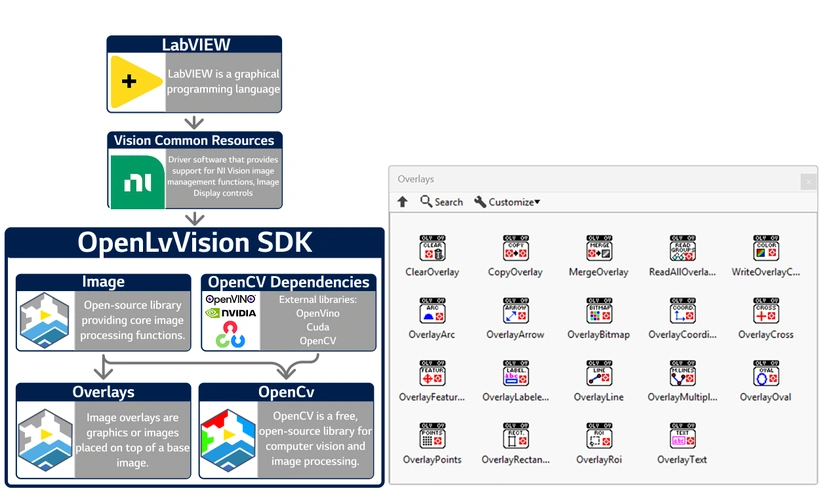
OpenLvVision Overlays provides a comprehensive suite of tools for adding non-destructive graphical overlays to your images. It allows you to seamlessly draw shapes, text, and regions of interest (ROIs) directly onto the image display without altering the underlying pixel data.
See full documentation at: openlvvision.org/docs/overlays/
Overlay Management
Easily manage, transfer, and configure the overlay data associated with your images.
Lifecycle & Manipulation: Clear existing overlays, copy overlays between image references, or merge multiple overlays together.
Functions: ClearOverlay, CopyOverlay, MergeOverlay.
Data & Attributes: Retrieve all overlay groups from an image or configure specific overlay rendering colors.
Functions: ReadAllOverlays, WriteOverlayColor.
Shapes & Geometry
Draw a wide variety of geometric shapes and indicators to highlight features or display measurements.
Basic Shapes: Draw fundamental geometric forms onto your image display.
Functions: OverlayArc, OverlayLine, OverlayMultipleLines, OverlayOval, OverlayRectangle.
Markers & Indicators: Place specific markers to indicate points of interest, directions, or coordinate systems.
Functions: OverlayArrow, OverlayCoordinates, OverlayCross, OverlayPoints.
Text, Regions & Advanced
Add contextual information, custom graphics, and complex regions of interest to your vision interface.
Text & Labels: Annotate your images with custom text strings or dynamic labeled indicators.
Functions: OverlayText, OverlayLabeled.
Regions & Features: Visually represent complex Regions of Interest (ROIs) or specific detected machine vision features.
Functions: OverlayRoi, OverlayFeature.
Custom Graphics: Insert external bitmaps directly into the overlay layer for custom branding or complex masking displays.
Functions: OverlayBitmap.
System Requirements
LabVIEW 2020 or newer (Community Edition supported).
Windows operating system.
Vision Common Resources (License Free)
Third Party Copyrights:
© 20002026 National Instruments Corporation. All rights reserved.
Third-party copyrights are property of their respective owners.


 Post an Idea
 Post a Resource