

-
 Try out the new Jake: AI Coding Assistant for LabVIEW!
Get answers to questions about LabVIEW and discuss your code.
VI Properties Editor by Redhawk - Toolkit for LabVIEW Download
Utility for mass editing properties and documentation of VIs and their individual controls
 Discussion

| Version | 2.0.0.47 |
| Released | Mar 29, 2026 |
| Publisher | Redhawk |
| License | MIT |
| LabVIEW Version | LabVIEW>=20.0 |
| Operating System | Windows, Mac, and Linux |
| Project links | Homepage Repository Discussion |
Description
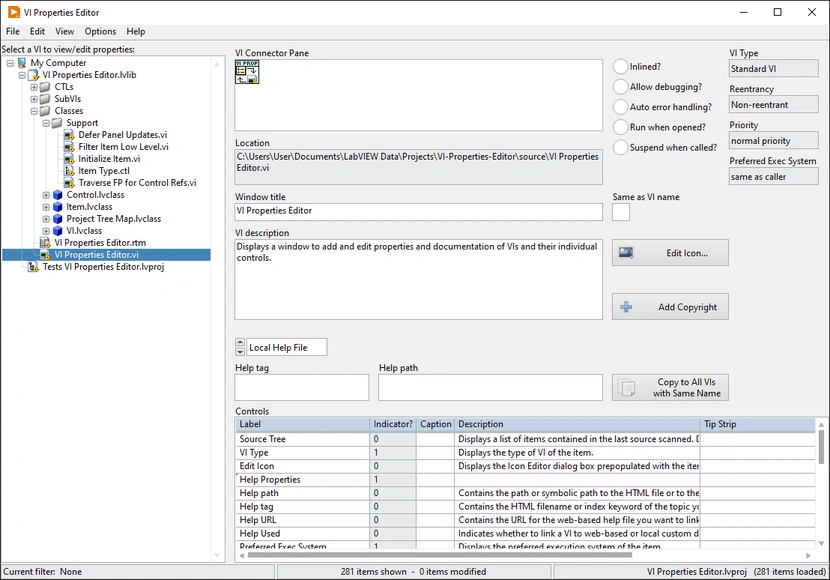
VI Properties Editor is a free, open-source utility that allows the user to mass edit VI properties and documentation by loading a folder, project, library, or class. After installing, it can be found in Tools > Redhawk > VI Properties Editor.
Features of VI Properties Editor:
- View VI Description formatted so that bold tags become bold text
- Ctrl-B shortcut to add bold tags to VI Description, Ctrl-Shift-B to remove nearest tags
- View all controls or only controls on the connector pane
- Copy a VI's properties to all other VIs with the same name
- Add or edit copyright info for all VIs or one-by-one
- Filter and sort VIs by custom filters which can leverage regular expressions
- Filter on saved data or edited data
- History of last 10 folders selected kept in Recent Folders
- History of last 10 projects/libaries/classes selected kept in Recent Files
- History of last 10 custom filters used kept in Recent Filters
- Optional confirmation dialogs for various high-risk actions
Properties of VIs that can be edited:
- Window Title
- Same as VI name?
- VI Description
- Help Path
- Help Tag
- Help URL
- Help Type
- Control names (labels)
- Control captions
- Control descriptions
- Control tip strips
The source code for this utility is a fork of VI Properties Editor by Merecs Engineering, which itself is a fork of VI Properties Editor by NI. See the associated GitHub repository for links to those upstream sources. If you find a bug or have a suggestion for an improvement, feel free to create an issue on GitHub.
Release Notes
- Changed the list of source items from a listbox to a tree with a hierarchical view, and added an option to show the items in a flat view. (#23)
- Added "Find and Replace" functionality that allows the user to update the properties of many VIs in a single action. (#19)
- Added an Edit Icon button that opens the Icon Editor dialog box prepopulated with the current VI's icon. (#25)
- Added support for `.ctl` and `.ctt` files. (#40)
- Changed control scanning routine to scan for nested controls, and added an option to show only top-level controls. (#43)
- Added a "case-sensitive" filter option. Previously, all filters were case-sensitive due to the filtering logic. (#45)
- Added user feedback for the current progress of the source-scanning operation.
- If the current VI is a type that doesn't have a connector pane, its VI icon will now be displayed in the VI Connector Pane indicator instead.
- Added an indicator to display the current VI's type (Standard, Polymorphic, Control, etc.).
- Added the ability to filter by control properties.
- Added a Help menu, and added an About dialog box that can be accessed through it.
- Fixed an issue where, if a VI was saved, captions would get added to every control, regardless of whether they had a caption before or not. (#46)
- Fixed an issue where opening a VI by double-clicking the VI in the list would not open the template (if a `.vit` file was selected) or prompt the user to save the VI (if it was edited). (#44)
- Fixed an issue where, after choosing a recent filter, the recent filter menu items no longer functioned as intended. (#41)
- Fixed an issue where the `is not empty` filter type did not function as intended. (#42)
- Fixed an issue where control properties were not being saved for Global VI types.






 Post an Idea
 Post a Resource