

-
 Try out the new Jake: AI Coding Assistant for LabVIEW!
Get answers to questions about LabVIEW and discuss your code.
OpenLvVision_Image by OpenLvVision - Toolkit for LabVIEW Download
Open source LabVIEW toolkit for image processing applications.
 Discussion

| Version | 1.2.2.2 |
| Released | Jan 06, 2026 |
| Publisher | OpenLvVision |
| License | BSD-3-Clause license |
| LabVIEW Version | LabVIEW>=20.0 |
| Operating System | Windows |
| Used By | openlvvision_lib_openlvvision_opencv openlvvision_lib_openlvvision_overlays |
| Project links | Homepage Documentation Repository Discussion |
Description
OpenLvVision
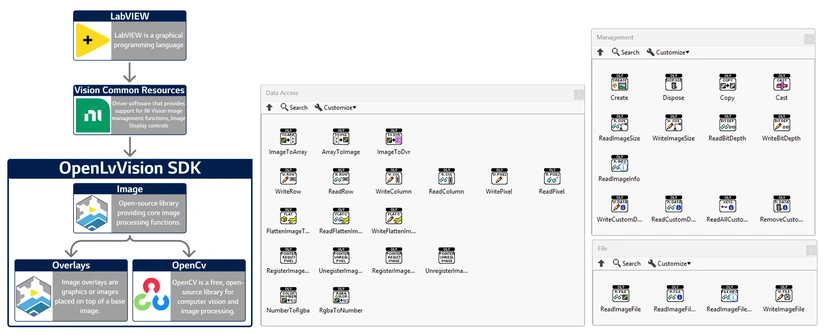
OpenLvVision is an open-source library designed for image processing within the LabVIEW environment. It bridges the gap between high-level Vision steps and low-level memory management, offering granular control over image data.
See full documentation at: openlvvision.org/docs/image/
Data Access
Rapidly convert between LabVIEW Arrays and Vision Images, or manipulate pixels directly.
Array Conversions: Rapidly convert between LabVIEW Arrays (1D/2D/3D) and Vision Images.
Supported Types: U8, U16, I16, U32, U64, SGL, Complex (CSG), and RGB (U32/U64).
Functions: Image To Array, Array To Image.
Direct Pixel Manipulation: Read and write specific pixels, rows, or columns without extracting the entire image.
Functions: Read/Write Pixel, Read/Write Row, Read/Write Column.
Zero-Copy Access (DVR): Utilize Data Value References to manipulate image data in-place for maximum speed.
Functions: Image To DVR.
Utilities:
Flatten Image To String (with compression options).
Number To Color / Color To Number (Convert between integer and RGBA structures).
File Input/Output
Robust tools for handling standard image files and web-ready data formats.
Standard Formats: Read and write common formats including BMP, JPEG, PNG, TIFF, and JPEG2000.
Functions: Read Image File, Write Image File (Polymorphic).
Web Integration: Easily convert images for web applications or APIs.
Functions: String To Base64, Get File String (Retrieve raw file bytes without saving to disk).
Management & Utilities
Essential tools for managing the lifecycle and metadata of your images.
Lifecycle Control: Safely manage image memory.
Functions: Create, Dispose, Copy, Cast (Convert Image Types).
Metadata & Info: Access and modify hidden image properties.
Functions: Read/Write Image Size, Read/Write Bit Depth, Read Image Info.
Custom Data: Attach custom key-value pairs directly to an image reference.
Functions: Read/Write Custom Data, Remove Custom Data, Read All Custom Keys.
System Requirements
LabVIEW 2020 or newer (Community Edition supported).
Windows operating system.
NI Vision Development/Runtime Module (No License required).
License
OpenLvVision is open-source software BSD-3.
Third Party Copyrights:
© 20002025 National Instruments Corporation. All rights reserved.
Third-party copyrights are property of their respective owners.



 Post an Idea
 Post a Resource