

-
 Try out the new Jake: AI Coding Assistant for LabVIEW!
Get answers to questions about LabVIEW and discuss your code.
Blue Formatter For LabVIEW by SAS Workshops - Toolkit for LabVIEW Download
Blue - Like Black, but for LabVIEW
 Discussion

| Version | 4.0.1.981 |
| Released | Jan 16, 2026 |
| Publisher | SAS Workshops |
| License | MIT |
| LabVIEW Version | LabVIEW>=20.0 |
| Operating System | Windows, Mac, and Linux |
| Dependencies | jdp_science_jsontext wiresmith_technology_lib_g_cli felipefoz_lib_lv_rainbow_terminal sas_workshops_lib_filewatcher |
| Project links | Homepage Documentation Repository Discussion |
Description
An autoformatter for LabVIEW inspired by Python's Black, LabVIEW's own Nattify and Felipe Silva's experiments.
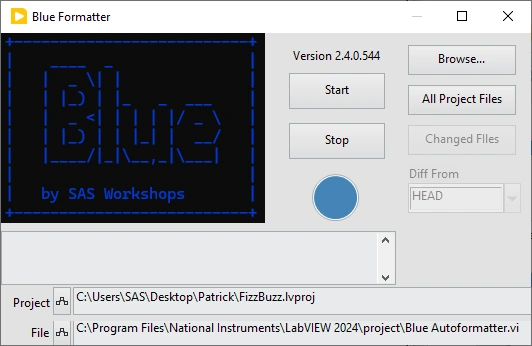
It can be run from the Tools Menu. This will open a GUI that allows you to run Blue on all files in your project. There is also an option to just run on files that have changed in Git as well from this GUI.
It can also be run as a G-CLI Tool. This can be really useful for Legacy Code.
In it's simplest form:
g-cli blue -- "Directory to Format"
It will find all VIs in the directory and run a set of autoformatting steps on them, similar to the Nattify Steps (in fact in the beginning exactly the Nattify, hopefully to be expanded in the future.)
For more info, see the readme here: https://gitlab.com/sas-blue/blue
Release Notes
- Added JSONtext dependency.


- Enhanced support for Custom Step Classes.
- Added ability to add a ~/.blue/blue_steps.json to specify the steps to load. This allows for loading custom steps as well as reordering or completely skipping existing steps. See readme for details.
- Added new CLI option --create-template to create template for the step list file, in order to allow adding custom steps. Simply edit the template to add your custom step. Then remove the .template extension from the file and it should work. Blue will now include your custom step when running.
- Got rid of Steps Library. This avoids having to load all Steps if they aren't all used (ie. if a steps file is provided that doesn't include them)
- Updated API Utility methods to require class input. Needed to do this for ones that required the Path to the file that specifies steps to load. Default behavior should be ok in most cases. So it will require changes to calling code but in most cases create constant should suffice.
- Fixed bug/issue [#5] in gitlab. Shrinking named bundlers was shrinking IPES if one side is unwired. Changed to check both sides and only shrink when both sides are unwired.
- Updated name that shows up in the undo menu when running from quickdrop.
- Moved location inside vilib from SAS/Blue Auto Formatter to simply SAS/blue. It was too verbose and since it was a major rev anyway, I felt empowered. I don't think it should affect anyone. I mean there is a blue API, but I haven't advertised it and haven't talked to anyone who was using it. If you are using it LabVIEW should just find it at a slightly different path. You might get a warning but that should be it. If you are using the API and this change broke something, I apologize.
- Tools Menu GUI now works on vims and vits. Was not watching for those file extensions previously.
- Now turns Autogrow off on Sequence Structures.

- Added code to not hide event data nodes pre-2020 so as not to force upgrade.
- Replaced Control Indicators to Edges with Arrange BD Terminals which arrange the BD terminal to match the order in which they are wire to the connector pane.
- Added help button to Steps List to avoid confusion. It seems no one reads the Readme. We'll see if they notice the help button.
- Added Controls Indicators to Edges Step
- Added Cleanup Wires Step
- Added Adjust Array Constant Sizes Step
- Added VI, PROJECT, LIBRARY, and COMPILED macros
- Updated the Step List Window to add all and none to select all or none.
- Updated the Step List Window to add a button for ignore files. This allows the user select a directory and create, overwrite, or append a .blueignore file based on the selected steps.
- Updated the Step List Window to allow for viewing Class/Library Steps, Project Steps, and Macros via a dropdown.
- Updated the Step List Window to allow multiple selection. If you just drag one step onto a BD you get a single blueignore comment, same as before. Now if you select mulitple steps, you can drag one of the selection and get a single blueignore comment that includes all the selected steps.
- Added code to Hide Unused Iteration Terminals to not run on anything pre 2020 since that feature was only introduced in 2020. We could run, but that cause the VI to be saved in 2020 and not preserve the original save version, so we are skipping that step.
- Add the Step List to the quickdrop shortcut with Shift. Now Shift control N brings up that window so that if you are using QuickDrop and want access to that Window you don't have to open the Tools Menu GUI.
- Added code to allow for QuickDrop formatting even if VI not saved yet.
- Fixed bug in Hide Unwired Event Data Nodes. Was only hiding data node in visible frame. Now hides all unwired event data nodes for all frames.
- Made Tools Menu GUI minimizable
- Added missing description for Hide Unused Event Data Nodes step
- Added a Steps List button to Tools Menu GUI. This lists all the VI steps in order. Hovering one of the steps will display the description as a tip strip. Dragging one of the steps onto a Black Diagram drops a BlueIgnore comment.

- Now supports back to 20.0 (previously was 24.0)
- Fixed bug with undo not working with QD.
- Added QuickDrop Support (ctl+n)

- Fixed bug that was causing error for class files when running on all files in project from Tools Menu due to class locking.
- Added Undo support

- Added step to hide unused Event Data Nodes
- Reverted previous fix to Nattify Arrange FP (which was launching by ref) and applied Darren's fix from the Nattify forum page (which was swapping a feedback node for a shift register).
- Added Step to shrink named unbundlers. Gets rid of unwired terminals in unbundle by name and event data terminals.
- Fixed bug with arranging front panel where sometimes controls overlapped.
- added step to hide unused iteration terminals.
- fixed issue where the core lib was broadcasting processing error and sending an error cluster for every file even if there was no error and sending an error cluster for every file.
- Fixed VI server ref conversion bug for Numeric Constant Show Radix
- Added Step for Numeric Constant Show Radix
- Updated Dependencies to include File Watcher.
- Changend Replace Empty String Constant into Replace String Constants, which works an any single character string constant (Empty, Space, Tab, Carriage Return, Line Feed).
- Added a String Constant Display step which makes the display style visible for string constants if it is not already set to normal. Also sets display style to slash codes if constant is just white space.
- Added code to Tools Menu GUI to display errors.
- Added a step to fix localized names by removing lvclass and lvlib suffixes. This shrinks class property nodes.
- Added more information to status output in the Tools Menu GUI. This makes it easier to tell when things happen like a file is not formatted due to blueignores.
- Added a Step to Remove Class Mutation History.
- Updated the tools menu GUI
- Made Tools GUI Window floating
- Added continuous file monitoring to Tools GUI
- Added a Browse button to Tools Menu GUI
- Got rid of non-strict mode. Everything is strict now. Typos will cause errors.
- Improved error handling in the CLI
- Updated Testing Infrastructure. Moving away from larger integration tests towards more targetted Unit Tests
- Fixed typo Seperate -> Separate. Added code so old blueignores and ignore comments should still work with old spelling.
- Added the ability to have steps for Projects.
- Added a step to Separate Compiled Code For Projects
- Added the ability to have steps for Libraries.
- Added a step to Separate Compiled Code For Libraries. This also works on classes.
- Updated Package Description to point out the Tools menu GUI.
- Fixed bug with vi templates.
- Changed CLI output on save from VI Saved to File Saved.
- Added caching for .blueignore file contents. Previously was reading them once for each file. Very inefficient. Now just reads them all one time at the beginning and condenses it all into a map for each directory.
- Updated wording in CLI output to reference Steps, not Tests.
- Added ability to set App Instance to the core API to avoid issues with locking classes when running form the tools menu.
- Readded lib_ prefix to libraries. Somehow the vipb lost that when I moved things around. This lead to some crosslinking when working on the project.
- Added ability to only run on changed files when running from the tools menu.
- Changed where supporting code was stored in vilib. Instead if inside the G-CLI tools folder, it is now inside the SAS folder.
- Added Pallette for Blue API to allow for extensions.
- Fixed issue with Replace Empty Constants causing errors if it found empty string constants as part of a cluster or array.
- Fixed Description for Icon View. See issue [#2] in GitLab
- Updated dependencies to include rainbow terminal
- Added a Replace Empty String Constant, inspired by Darren's GDevCon NA presentation.
- Had help from Eric Stach and Eric Schlieper.

- Added some color to the terminal
- Added a simple GUI to Tools menu
- Fixed bug with elapsed processing time
- Added h:m:s display to total elapsed time in addition to ms

- Major refactoring to seperate out core logic from G-CLI wrapper. Should be transparent to users.
- Added a NATTIFY macro to capture existing NATTIFY steps so as we add more if a user just wants the original NATTIFY steps, they can do that.
- Will no longer error out if a directory includes a file with the BD removed (either completely removed or PW protected).
- Fixed bug that would throw error when saving VIT files.
- Now works on VIMs
- added a --force CLI option
- added banner
- Fixed bug with nested .blueignores
- Fixed bug with --only option.


 Post an Idea
 Post a Resource
Recent Posts
Downloading Blue Formatter For LabVIEW...
Installation will start automatically within VIPM Desktop.
If the download does not start automatically, restart the download now.
VIPM Desktop comes installed with LabVIEW. If you don't have it, you can get VIPM Desktop here.